The Bitwise Operators
The bitwise operators are similar to the logical operators, except that they work on a smaller scale -- binary representations of data.The following operators are available:
- op1 & op2 -- The AND operator compares two bits and generates a result of 1 if both bits are 1; otherwise, it returns 0.
- op1 | op2 -- The OR operator compares two bits and generates a result of 1 if the bits are complementary; otherwise, it returns 0.
- op1^ op2 -- The EXCLUSIVE-OR operator compares two bits and returns 1 if either of the bits are 1 and it gives 0 if both bits are 0 or 1.
-
~op1 -- The COMPLEMENT operator is used to invert all of the bits of the operand. - op1 >> op2 -- The SHIFT RIGHT operator moves the bits to the right, discards the far right bit, and assigns the leftmost bit a value of 0. Each move to the right effectively divides op1 in half.
- op1 << op2 -- The SHIFT LEFT operator moves the bits to the left, discards the far left bit, and assigns the rightmost bit a value of 0. Each move to the left effectively multiplies op1 by 2.
Bitwise operators are used to change individual bits in an operand. A single byte of computer memory-when viewed as 8 bits-can signify the true/false status of 8 flags because each bit can be used as a boolean variable that can hold one of two values: true or false. A flag variable is typically used to indicate the status of something. For instance, computer files can be marked as read-only. So you might have a $fReadOnly variable whose job would be to hold the read-only status of a file. This variable is called a flag variable because when $fReadOnly has a true value, it's equivalent to a football referee throwing a flag. The variable says, "Whoa! Don't modify this file."
When you have more than one flag variable, it might be more efficient to use a single variable to indicate the value of more than one flag. The next example shows you how to do this.
Example: Using the &, |, and ^ Operators
The first step to using bitwise operators to indicate more than one flag in a single variable is to define the meaning of the bits that you'd like to use. Figure 5.1 shows an example of 8 bits that could be used to control the attributes of text on a display.
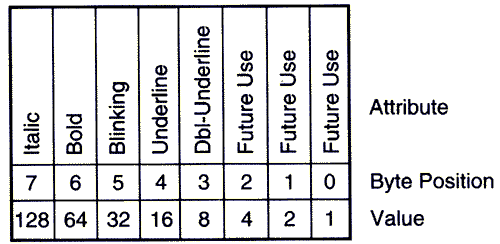
If you assume that $textAttr is used to control the text attributes, then you could set the italic attribute by setting $textAttr equal to 128 like this:
$textAttr = 128;because the bit pattern of 128 is 10000000. The bit that is turned on corresponds to the italic position in $textAttr.
Now let's set both the italic and underline attributes on at the same time. The underline value is 16, which has a bit pattern of 00010000. You already know the value for italic is 128. So we call on the OR operator to combine the two values.
$textAttr = 128 | 16;or using the bit patterns (this is just an example-you can't do this in Perl)
$textAttr = 10000000 | 00010000;You will see that $textAttr gets assigned a value of 144 (or 10010000 as a bit pattern). This will set both italic and underline attributes on.
The next step might be to turn the italic attribute off. This is done with the EXCLUSIVE-OR operator, like so:
$textAttr = $textAttr ^ 128;
Example: Using the >> and << Operators
The bitwise shift operators are used to move all of the bits in the operand left or right a given number of times. They come in quite handy when you need to divide or multiply integer values.
This example will divide by 4 using the >> operator.
$firstVar = 128;

$secondVar = $firstVar >> 2;

print("$secondVar\n");
Here we
- Assign a value of 128 to the $firstVar variable.
- Shift the bits inside $firstVar two places to the right and
- assign the new value to $secondVar .
- Print the $secondVart variable.
32Let's look at the bit patterns of the variables before and after the shift operation. First, $firstVar is assigned 128 or 10000000. Then, the value in $firstVar is shifted left by two places. So the new value is 00100000 or 32, which is assigned to $secondVar.
The rightmost bit of a value is lost when the bits are shifted right. You can see this in the next example.
The next example will multiply 128 by 8.
$firstVar = 128;

$secondVar = $firstVar << 3;

print $secondVar;
The program produces the following output:
1024The value of 1024 is beyond the bounds of the 8 bits that the other examples used.
Source

No comments:
Post a Comment